See where you've been on a real map.
Explore color-coded routes and a smooth GPS point-density heatmap from your Google Maps Timeline. Direct JSON stays in your browser; ZIP imports are temporarily processed on the server.
The fictional Central Florida demo includes a GPS sample-density heatmap. Its Free range follows the sample's newest date, not today. How the heatmap works.
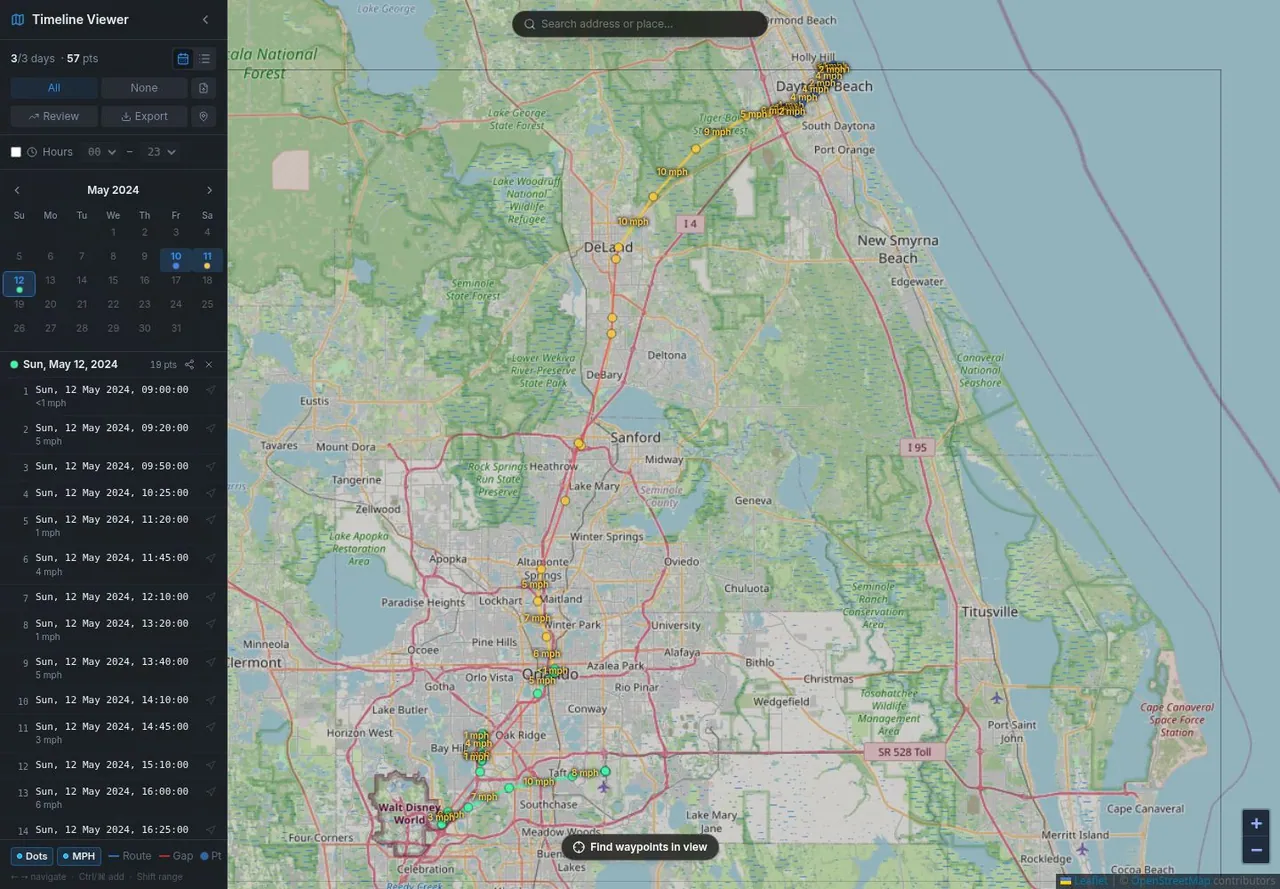
A real screenshot of color-coded routes; open the demo to turn on its GPS point-density heatmap.
Your timeline stays yours.
Direct JSON imports are parsed locally without uploading the file. ZIPs are temporarily sent to the server for extraction and virus scanning; their JSON contents return to your browser, and temporary server files are cleaned up.
No account required
No accounts, advertising, or cross-site tracking.
Local-only JSON
Direct JSON imports are parsed in your browser, not uploaded.
Temporary ZIP processing
Sent to the server for extraction and virus scanning. JSON contents return to your browser; temporary server files are cleaned up.
What you'll see
Day-colored routes
Each day a color — overlaps become obvious.
Time-of-day filter
Slice by hour: morning commutes, evening walks.
Find waypoints in view
Pan anywhere, list every day you visited.
Export selected days
Save the days you care about as GPX or KML.
Location history heatmap
See smooth GPS sample density, separate from visits and time spent.
Free viewer, lifetime Pro tools
The core viewer remains free, including its GPS point-density heatmap. Lifetime Pro adds custom heatmap date ranges, local date-range insights, movement estimates and reports. Planned Memory Map features are not included.
Free
Everything the viewer does now, including imports, maps, filters, review, place labels, exports and print. The sample-density heatmap covers up to the latest 30 calendar days in loaded data, ending on its newest sample date—not today.
- Direct JSON importsParse timeline JSON locally in your browser.
- ZIP importsTemporary server extraction, virus scanning, and cleanup.
- Interactive mapsExplore routes, waypoints, and speed information.
- Date and hour filtersFind dates and filter the routes you already have.
- Timeline reviewKeep current history summaries, statistics, and milestone review.
- Existing exportsKeep all current export and print options.
- Place labelsUse the current place-labeling tools.
Pro Lifetime · $29
Use your own timeline for custom heatmap date ranges or all loaded data, plus range insights, movement estimates and reports. Visit and time-spent rankings remain separate; Memory Map remains planned.
Checking Pro purchase availability…
- Checking checkout settings.
- One-time lifetime payment, no subscription and no account.
- Checking purchase restoration availability.
- No timeline data is sent to Stripe.
Purchase recovery options are loading.
Restore a purchase
Checking restoration availability…
How it works
Three steps, about two minutes.
Export from Google
Android: phone Settings → Location → Location services → Timeline → Export Timeline data. iPhone: Google Maps → Profile → Settings → Location & Privacy → Export Timeline data.
Drop it in
Import .json directly for local parsing without uploading. ZIP imports temporarily go to the server for extraction and virus scanning; JSON contents return to your browser and temporary server files are cleaned up.
Explore
Explore routes and GPS point density; visit and time-spent rankings use separate visit data.
Or try the demo first — no data needed.
Learn your Timeline and its heatmap
Find your export, understand its data, and see how sample density differs from visits.
How to export your Google Maps Timeline
How to export Google Maps Timeline from Android, iPhone, or Google Takeout, choose the right JSON or ZIP, and explore a GPS point-density heatmap.
4 min read
What's inside timeline_export.json
Understand timeline_export.json: visits, activity segments, raw location signals, and which timestamped GPS points appear in a Google Maps Timeline heatmap.
5 min read
Google Maps Timeline Heatmap: What It Shows
Learn how Timeline Viewer turns timestamped GPS samples into a smooth location-history heatmap—and how its date ranges differ from visit and time-spent rankings.
5 min read
GPX vs KML for location data
Two common formats for sharing routes and waypoints. Learn the differences between GPX and KML, when to choose each, and which apps support them.
4 min read
Common questions
Do you store my location data?
Direct JSON imports are parsed locally in your browser; that import path does not upload the file. ZIP imports temporarily send the archive to the server for extraction and virus scanning. The extracted JSON contents are returned to your browser for parsing, and the server runs cleanup of temporary upload and extraction files. ZIP processing is temporary, not a saved location-history service.
What format does Google export?
Two: the new timeline_export.json from the Google Maps Android app, and the older Records.json or per-month files from Google Takeout. Pick the matching tab when you upload.
What does the Google Maps Timeline heatmap show?
It shows smooth point density from valid, timestamped GPS location samples—not visits or time spent. Free covers up to the latest 30 calendar days in the loaded data, ending on its newest sample date, not today. Pro adds custom date ranges or all loaded data. Visit counts and time-spent rankings use separate visit events and available start/end times. Read the heatmap guide.
Why is it free?
Timeline Viewer began as a hobby project to explore the latest web development and cybersecurity tools while protecting user privacy. It also gives us firsthand experience with the challenges small and medium-sized businesses face when building and running a website. We bring those lessons back to our everyday work in cybersecurity. The core viewer remains free. Checking current Pro purchase availability.
What measurement is collected?
We use aggregate analytics to understand how the site is used. Optional Microsoft Clarity analytics run only on guide pages after you opt in. Your timeline contents are not included in these analytics. See our Privacy Policy for details.
Direct JSON imports are parsed locally without uploading the file. ZIP imports temporarily go to the server for extraction and virus scanning; their JSON contents return to your browser for parsing, and temporary server files are cleaned up.